Bringing a BBS to the Web
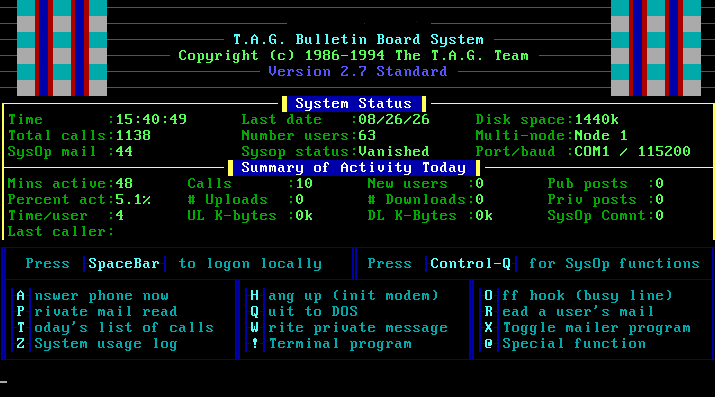 Who doesn’t love some feel-good nostalgia? I fondly remember rushing home from school in the early 90s to get an opportunity to dial up some local bulletin boards. Using computers was always fun, but being able to connect and communicate to others through them was a whole nother level. Playing multiplayer
games like Legend of The Red Dragon, or Trade Wars 2002 was a blast! Sharing messages, files, and meeting a whole group of people that you’d probably never have otherwise met or connected with.
Who doesn’t love some feel-good nostalgia? I fondly remember rushing home from school in the early 90s to get an opportunity to dial up some local bulletin boards. Using computers was always fun, but being able to connect and communicate to others through them was a whole nother level. Playing multiplayer
games like Legend of The Red Dragon, or Trade Wars 2002 was a blast! Sharing messages, files, and meeting a whole group of people that you’d probably never have otherwise met or connected with.
Things changed quickly once dial-up on-ramps to the Internet became available. Local BBS systems were lost to the mists of history while the community became global. I’ve thought about bringing a BBS back to functionality in modern times, but never pulled the trigger on it. I happened to listen to a talk that convinced me that these old technologies don’t need to be forgotten, they can live on.
So I decided to bring an old T.A.G. 2.7 BBS back to life. I wanted to make it available to be used with nothing more than a modern web browser.
I was under no illusions that this would attract active users ever again. I expected it would serve very little purpose, if any, save for my own satisfaction that I was able to make it functional in some simulacrum of how I remember it.
I wanted to preserve the original experience: ANSI screens, multiple callers, node messages, file areas, games, and even ZMODEM file transfers.
Architecture
I ended up choosing to run this in multiple DOSBox-X instances for the multi-node / multi-line support. Each instance presents one T.A.G. node on its own local TCP port.
A Node.js gateway turns those raw terminal streams into browser sessions, keeps track of the eight “phone” lines, and shares their status. The public web server only sees HTTPS and WebSockets; a reverse SSH tunnel carries the traffic back to the BBS machine.
Each node has its own working directory, while sharing the main T.A.G. installation and data files.
Browser
  │ HTTPS / WebSocket
  ▼
Apache on public server
  │ localhost:3000 through reverse SSH tunnel
  ▼
Node.js gateway on Windows host
  ├── TCP 2301 ──► node 1
  ├── TCP 2302 ──► node 2
  ├── TCP 2303 ──► node 3
  └── ... through node 8
The browser is simply a terminal client.
The DOSBox-X node layout
I installed the original T.A.G. system once, then created a separate node directory for each node beneath the T.A.G. directory:
C:\TAG\
├── NODE1\
├── NODE2\
├── NODE3\
└── ...
The node identity is configured in T.A.G.’s own multi-node settings, stored in the node-specific STATUS.DAT file. This was an important factor since it was not simply via a command line flag. T.A.G. reported the selected node during startup, and
each process returned to its own STATUS.DAT file contained in their node directory: C:\TAG\NODE#
I use one DOSBox-X configuration file per node. Here is the relevant part of my node 1 configuration:
# C:\BBS-DOSBox\tag-node1.conf

[serial]
serial1=modem baudrate:115200 listenport:2301
xonxoff=true

[dos]
share=true
nocachedir = true
file access tries = 3

[autoexec]
mount c c:\tag -t floppy
c:
cd \tag
set path=c:\tag\utils;c:\tag;%path%
adf com1 3f8 4 115200 8192 8192 8
call c:\tag\node1\tag.bat
Node 2 is the same idea with a different listener:
# C:\BBS-DOSBox\tag-node2.conf

[serial]
serial1=modem baudrate:115200 listenport:2302
xonxoff=true

[dos]
share=true
nocachedir = true
file access tries = 3

[autoexec]
mount c c:\tag -t floppy
c:
cd \tag
set path=c:\tag\utils;c:\tag;%path%
adf com1 3f8 4 115200 8192 8192 8
call c:\tag\node2\tag.bat
I repeated this through port 2308. T.A.G. still uses COM1 inside each DOSBox-X instance, but each virtual machine process has its own COM1 and its own TCP listener. That way it scales cleanly to several nodes without needing eight COM ports.
The connection type is TCP RAW, not Telnet. A Telnet client can be useful for a quick test, but not for the actual terminal or file-transfer path.
The slow-text problem
At first, the board appeared to paint characters painfully slowly even though the local TCP connection was fast. Matching the baud rate alone did not solve it.
The key setting was switching over to a fossil driver (adf) and telling T.A.G. to use the fossil driver (as shown in the above node configuration files).
The browser gateway
The gateway has three jobs:
- Track eight local DOSBox-X ports and whether each one is occupied.
- Assign an available node to a new WebSocket caller, or hold that caller in a queue.
- Bridge bytes in both directions without treating terminal data as text during a file transfer.
The central idea is deliberately simple:
const NODE_PORTS = [2301, 2302, 2303, 2304, 2305, 2306, 2307, 2308];

function connectCaller(webSocket, port) {
  const tagSocket = net.createConnection({
    host: '127.0.0.1',
    port,
  });

  tagSocket.on('data', (bytes) => {
    // Forward exact bytes to the browser.
    webSocket.send(bytes, { binary: true });
  });

  webSocket.on('message', (bytes, isBinary) => {
    if (isBinary && !tagSocket.destroyed) {
      tagSocket.write(bytes);
    }
  });
}
The gateway also has cleanup, an idle timer, a keepalive, line-state broadcasts, queue handling, and error handling. The line is owned by one WebSocket session and becomes available when that WebSocket closes, the BBS connection closes, or the idle timer expires.
Every connected browser receives the current shared line status.
ANSI, CP437, and the terminal frontend
I used xterm.js for the browser terminal. ANSI color worked once the data reached xterm.js as a normal terminal stream, but old BBS art is usually CP437 rather than Unicode. A small CP437 decoder was necessary for box drawing and extended characters to look right. It took much troubleshooting to make sure it worked to my satisfaction.
The rule I followed was:
- Decode CP437 only for terminal display.
- Keep WebSocket and ZMODEM data as bytes.
- Do not run binary transfer data through a text encoder or ANSI renderer.
The keyboard also needed a small compatibility fix. Browsers commonly send Backspace as DEL (0x7f), while the DOS application expected Ctrl-H (0x08):
terminal.onData((data) => {
  const tagInput = data === '\x7f' ? '\x08' : data;
  sendToBbs(new TextEncoder().encode(tagInput));
});
Getting ZMODEM to work
This was the most interesting part of the project.
The most useful baseline was testing with SyncTERM configured for TCP RAW. Once SyncTERM could perform a transfer, I knew DOSBox-X, T.A.G., DSZ, and the raw port were capable of working. The remaining problem was browser-side ZMODEM interoperability.
I used zmodem.js, but the stock behavior did not work with the older DSZ ZMODEM sender/receiver I was using in T.A.G. The failures were very specific: downloads would stall at 1024 bytes, larger uploads would fail, and one library helper did not match the installed API.
1. Acknowledge DSZ’s ZCRCW frames
The first download stalled at exactly 1024 bytes. The capture showed DSZ sending a ZCRCW frame: a frame that ends and expects a ZACK. The original zmodem.js condition only acknowledged a frame when it was not a frame end.
In my local copy of node_modules\zmodem.js\dist\zmodem.devel.js, I changed the receive-side logic from this:
- if (subpacket.ack_expected() && !subpacket.frame_end()) {
+ if (subpacket.ack_expected()) {
    this._send_header(
      'ZACK',
      Zmodem.ENCODELIB.pack_u32_le(this._file_offset)
    );
  }
You cannot assume frame_end() means no acknowledgement is required. DSZ legitimately uses ZCRCW, and the sender waits for the acknowledgement before continuing.
2. Do not discard the next-header handler between ZDATA frames
The transfer then progressed much farther but later dumped binary-looking data into the terminal. The receiver had accepted one ZDATA frame and prematurely discarded state needed to accept subsequent ZDATA headers.
The exact source layout depends on the zmodem.js release, but the behavior to preserve is this:
// Rule inside the receive state machine:
// ZDATA may repeat many times within one accepted file transfer.
// Keep the handler that recognizes ZDATA / ZEOF until the file ends.

if (newHeader.NAME !== 'ZDATA') {
  this._next_header_handler = null;
}

handler.call(this, newHeader);
This is not meant as a blind search-and-replace for every release, but it documents the protocol issue: the receiver must continue to recognize repeated ZDATA headers and finally recognize ZEOF. Once that state handling was corrected, a download could run to the end rather than switching back to terminal
output in the middle of the file.
3. Force the compatible ZRINIT capability flags
The raw TCP stream was not using XON/XOFF, but the original combination of capabilities still did not work well with DSZ. I made the initial ZRINIT advertise the conservative CRC / escaped-control-character behavior that DSZ handled reliably in this setup.
The browser gateway sees the outgoing ZRINIT as bytes. My helper code detects that initial 21-byte hexadecimal ZRINIT message, changes the advertised flags, recalculates the checksum, and sends the corrected bytes onward.
function forceDszCrc16(frame) {
  // Apply only to the initial ASCII-hex ZRINIT frame.
  // The exact parsing code is gateway-specific; do not rewrite arbitrary data.
  if (!isInitialZrinit(frame)) return frame;

  // Working capability byte: CRC16 with escaped control characters.
  const flags = 0x43;
  return rebuildZrinitWithFlagsAndChecksum(frame, flags);
}
This is a targeted compatibility shim for the initial ZRINIT, not a transformation applied to all transfer bytes.
4. Save downloads from the payload events
The installed zmodem.js version did not provide the transfer.get_payloads() helper I expected. Rather than depend on a missing convenience method, I collected payload events and built the browser download myself:
const chunks = [];
let receivedBytes = 0;

transfer.on('input', (payload) => {
  const chunk = payload instanceof Uint8Array
    ? payload
    : new Uint8Array(payload);

  chunks.push(chunk);
  receivedBytes += chunk.length;
  setConnectionState(`Downloading: ${details.name} (${receivedBytes} bytes)`);
});

transfer.accept().then(() => {
  const file = new Blob(chunks, { type: 'application/octet-stream' });
  const url = URL.createObjectURL(file);
  const link = document.createElement('a');

  link.href = url;
  link.download = details.name;
  document.body.appendChild(link);
  link.click();
  link.remove();

  setTimeout(() => URL.revokeObjectURL(url), 60_000);
});
That produced a normal browser download, and the resulting ZIP file that was downloaded opened correctly.
5. Close the upload session and reduce upload chunks
Small browser uploads initially reported success even while DSZ kept retrying and timing out. The browser sent the file but did not finish the ZMODEM session. Closing it after send_files() resolved that part:
Zmodem.Browser.send_files(session, filesToUpload)
  .then(() => session.close())
  .then(() => {
    setConnectionState('Upload complete');
  });
Larger uploads still needed one more compatibility change. I reduced the library’s MAX_CHUNK_LENGTH from 8192 to 1024 in my local zmodem.devel.js:
- MAX_CHUNK_LENGTH = 8192
+ MAX_CHUNK_LENGTH = 1024
That made larger DSZ uploads reliable in my environment.
Publishing it safely with reverse SSH
The BBS machine is behind the public web server. Instead of exposing the Node.js port to the Internet, the machine running the BBS gateway initiates a reverse SSH tunnel to the web front-end. Apache is the only public-facing service.
On Apache, the important detail is WebSocket upgrade support:
ProxyPreserveHost On
ProxyTimeout 3600

ProxyPass        /  http://127.0.0.1:3000/ upgrade=websocket
ProxyPassReverse /  http://127.0.0.1:3000/
The site loaded before this setting was added, but the BBS connection did not establish. upgrade=websocket was the missing piece.
Binding the reverse listener to 127.0.0.1 keeps the Node.js port private. Apache terminates HTTPS and proxies locally into the tunnel.
The current system is simply a hobby project. The core goal was to get a BBS exposed in a usable web interface. The web layer provides a terminal-like front door, line selection and queueing, and working file transfers without replacing the software the BBS originally ran.
Give It A Try
If you’d like to check it out, here it is: bbs.lahti.dev